Overview
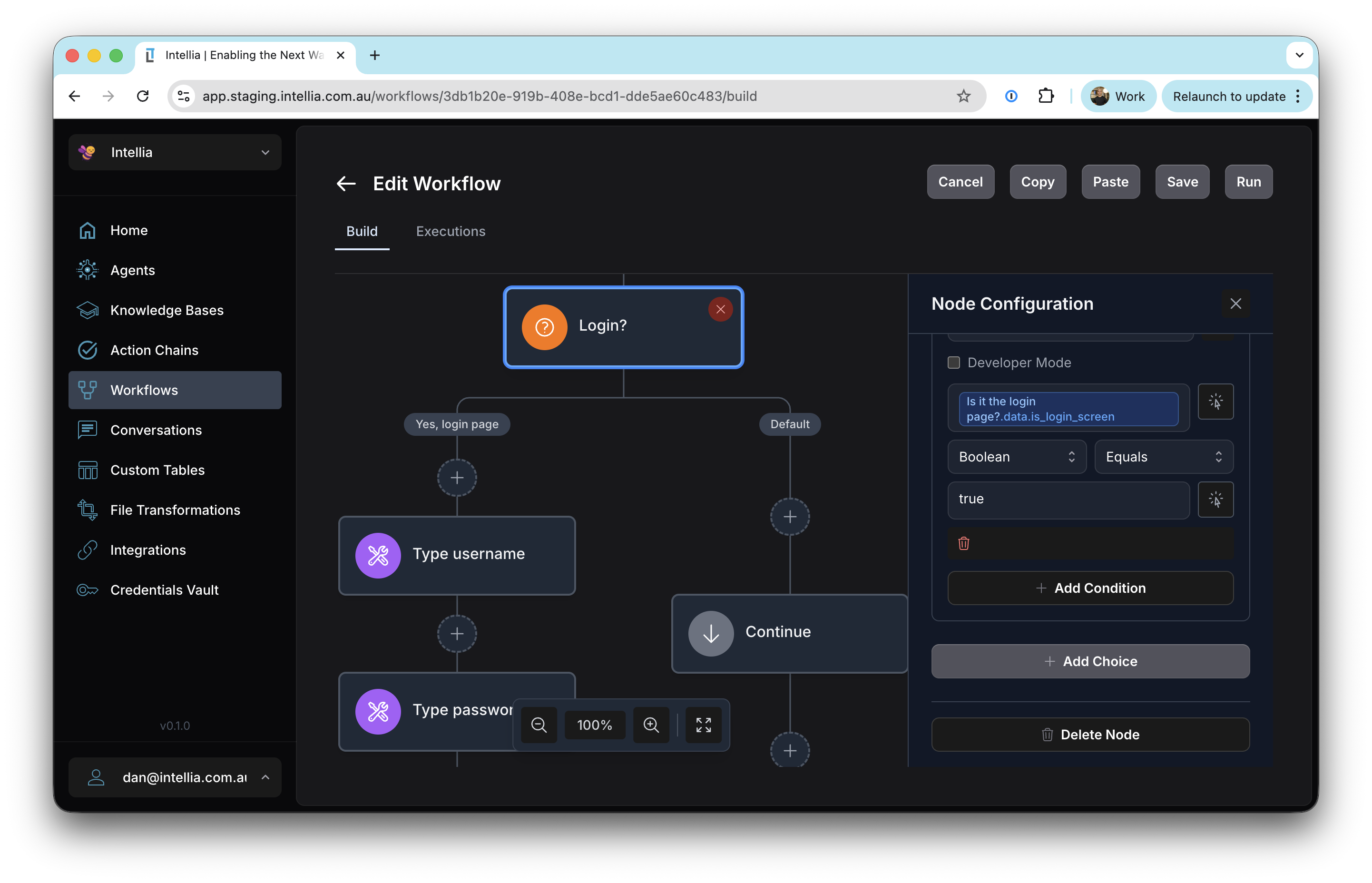
Accessible via: Main Menu -> Workflows -> [Workflow Name]
What are Workflows?
Workflows in Intellia are visual, code-free automations that orchestrate complex multi-step processes. Think of workflows as flowcharts that come to life—they combine AI agents, tools, conditional logic, loops, and human interactions into a single coordinated automation.
Unlike standalone agents that handle conversations, workflows are designed for structured, repeatable processes where you need precise control over the sequence of operations and the flow of data between steps.
Core Concepts
Nodes
Nodes are the building blocks of workflows. Each node represents a single step in your automation:
- Execution Nodes: Perform actions (run agents, call tools, execute code, execute other workflows)
- Flow Control Nodes: Control the flow (branch on conditions, loop, run parallel tasks)
- Interaction Nodes: Wait for human input (approvals, external callbacks)
- Terminal Nodes: Define workflow outputs or end execution
Branches
Workflows can split into multiple paths (branches) that execute different nodes based on conditions. Branches allow you to:
- Handle different scenarios (if-then-else logic)
- Process multiple items in parallel
- Organize complex workflows into logical sections
Data Flow
Data flows through workflows using JSONPath expressions. Each node can:
- Access data from previous nodes via
$.results.nodeId.outputField - Reference the trigger input via
$.results.trigger.fieldName - Use the workflow execution context via
$.intelliaContext
Example: If you have a node with ID validateAddress that outputs a formatted field, you can reference it as $.results.validateAddress.formatted in subsequent nodes.
Success and Failure Paths
Every node can define what happens next:
- onSuccess: The node to execute when the current node succeeds
- onFailure: The node to execute when the current node fails (optional)
This enables robust error handling throughout your workflow.
Workflow States
Draft
Workflows start in draft mode, where you can:
- Build and modify the workflow structure
- Add and configure nodes
- Test the workflow design
- Make changes without affecting production
Draft workflows cannot be executed—they’re purely for design and development.
Published
When you publish a workflow, Intellia validates and deploys it for production execution. Published workflows:
- Can be executed via the Intellia API or UI
- Cannot be modified (you must unpublish first)
- Are assigned a unique identifier for tracking
- Appear in the workflow execution list
Workflow Execution
When a workflow runs:
- Trigger: The workflow starts with trigger data (JSON input or knowledge base file)
- Node Execution: Nodes execute in order, following success/failure paths
- Data Accumulation: Each node’s output is stored in
$.results.nodeId - Completion: The workflow ends when it reaches an End node or Set Output node
- Result: The final output is available via the execution API
All executions are tracked with:
- Execution ID and timestamp
- Current status (RUNNING, SUCCEEDED, FAILED, TIMED_OUT, ABORTED)
- Input and output data
- Detailed execution history and event logs
Integration with Intellia Components
Workflows seamlessly integrate with other Intellia features:
- Agents: Execute AI agents as part of workflow steps
- Tools: Call any configured tool directly
- Knowledge Bases: Agents in workflows can use knowledge bases
- Credentials: Use vault items for secure credential storage (e.g., passwords, API keys)
- Browser Sessions: CDP tools maintain browser state across workflow nodes
- Nested Workflows: Execute other workflows as nodes for modular design
This integration makes workflows incredibly powerful—you can combine the intelligence of AI with the structured control of automation workflows.